


PromptApp: AI Image Generator
4.155.00 Reviews
App Specs
- Version
- 1.3.2
- Updated On
- License
- Free
- Downloads
- 100,000+
- Developer
- AI Research Group
- Categories
- Art & Design
- Platform
- Android
Screenshots
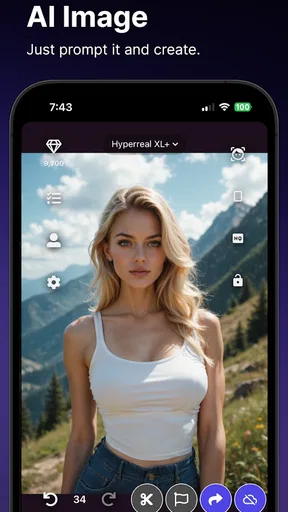
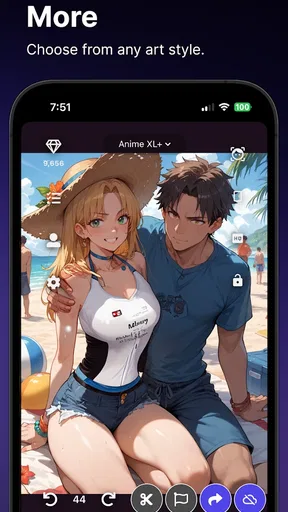
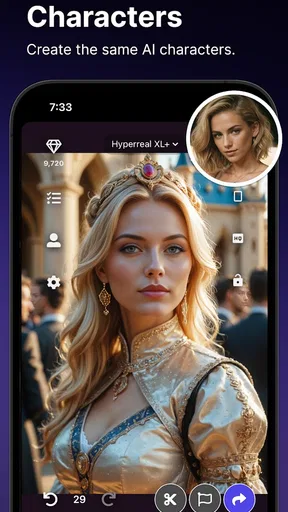
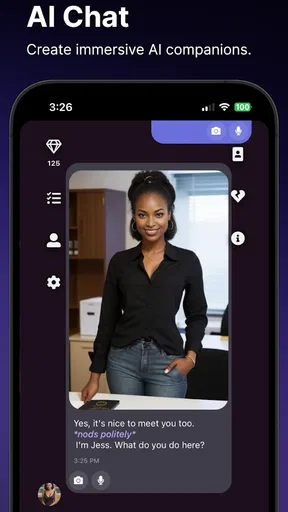
 Analysis by AppCompare
I like the idea behind PromptApp: AI Image Generator: describe an image in ordinary language and let the app turn that starting point into visual material you can shape. That makes it appealing even if you have never opened a professional art program. It is an art-and-design app from AI Research Group, and its focus is less on teaching drawing technique than on helping you move quickly from an idea to an image.
The distinction matters. A prompt-based generator is not a substitute for every kind of creative software, and it does not remove the need to make choices. You still have to decide what you want to see, judge whether the result suits your purpose, and refine the parts that feel off. I find that the most useful way to approach it is as a sketching partner: it gives an idea a visual form, while the final judgment remains yours.
The appeal of turning a short prompt into an image
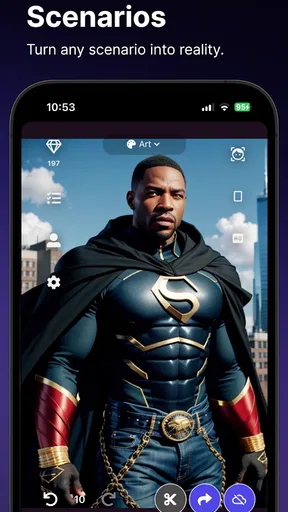
The central capability is text-to-image creation. You can start with a compact description rather than building an image from scratch, which lowers the barrier for quick experiments. A phrase such as “a small bookshop on a rainy street” gives you a concrete direction; adding details about mood, colors, or composition can make the request more specific. The practical benefit is not simply speed. It is being able to explore visual possibilities before committing to a more involved design process.
Style selection adds another useful decision point. A subject can feel very different when approached as watercolor, abstract art, or pop art, so I would treat style as part of the idea rather than a finishing decoration. If you are making a poster concept, for instance, a bold graphic look may communicate better than a soft painterly one. Trying a few styles with the same subject can help you discover which direction fits the job instead of settling for the first plausible result.
There is also editing after generation, including adjustments to brightness and contrast and the option to apply filters. That gives you room to improve the feel of an image without having to leave the app immediately. It is a modest but meaningful bridge between generating a picture and making it your own. I would still think of these tools as finishing touches rather than a full replacement for a dedicated editor when precise retouching or detailed layer work is important.
Getting Started with PromptApp
So, let's dive right into it. When you first open PromptApp: AI Image Generator, you're greeted with a sleek and straightforward interface. It's almost like the app is saying, "Hey, no worries! I've got your back." The design is intuitive, making it super easy to navigate, even if you're just dipping your toes into the world of AI-generated art.
One of the first things you'll notice is how quickly you can get started. Just type in a few keywords about the image you want to create, and boom, the app does its magic. For example, type "sunset over a mountain" and watch the app conjure up a breathtaking scene that looks like it belongs on the cover of a travel magazine.
Worth Reading Before You Choose

EA SPORTS FC Mobile 26 Is a Bigger Football Game, but It Takes Time

Flipboard Shows What News Apps Must Do Beyond the Feed

Switching to Android Auto Means Rethinking Your Driving Routine

Google Calendar Makes a Crowded Week Easier to Manage

Ludo King Makes the Most of the Minutes Between Plans

Baby Panda World Brings Quick Play to Modern Phones, but Its Game Library Feels Busy
Features That Stand Out
Now, let's talk about the features because this app is packed with them. One of my personal favorites is the style selection. Whether you're into watercolor, abstract, or even a modern pop art vibe, this app has got you covered. It’s like having a digital art studio in your pocket.
Another cool feature is the editing tools. Once the image is generated, you can tweak it to your heart's content. Adjust the brightness, contrast, or add filters to give it that extra oomph. The app offers a surprising amount of control for something that's primarily AI-driven.
Performance and Usability
In terms of performance, PromptApp is a powerhouse. It runs smoothly without any noticeable lag, and the images are generated in just a few seconds. This is perfect for those moments when inspiration strikes and you want to capture your vision right away.
Usability-wise, it's a breeze. Even if you’re not tech-savvy, the app holds your hand through the process. The developers clearly put a lot of thought into making this as user-friendly as possible without sacrificing any of the functionality.
A practical workflow for better results
For a more dependable result, I would build a prompt in layers rather than piling on unrelated keywords. Start with the main subject, then add the setting, the mood, and one or two visual details that matter most. For example, if you want a cozy café illustration, clarify whether the focus is the window, the counter, or a cup on a table. A prompt with a clear focal point is easier to evaluate than a long list of competing objects.
When a first image is close but not quite right, change one part of the description at a time. If you change the subject, lighting, style, and color direction all at once, you may get a different picture without learning which edit helped. Keeping the subject stable while testing styles is a useful way to compare options. Then, once the composition feels right, brightness, contrast, and filters can help adjust the image’s overall tone.
This approach is especially handy for small creative tasks with a short deadline. Imagine you are preparing a casual invitation for a family get-together and want a cheerful background rather than a blank template. You could explore a few visual directions, pick one that feels warm, and make a basic tonal adjustment before sharing it. I would use the result as a starting visual, then check that any text added elsewhere remains readable and does not compete with the artwork.
Where it fits among creative apps
Compared with drawing apps, this is a better fit when you want an image concept without manually sketching every element. A drawing app gives you direct control over each mark, which is valuable when accuracy and deliberate handwork matter. Prompt-led creation reverses that balance: it is convenient for exploration, but the result may not match your exact mental picture. If you need a precise logo, a consistent character across many assets, or exact placement of every object, a conventional design or illustration tool is the safer choice.
It also differs from a standard photo editor. A photo editor starts with an existing picture and gives you tools to adjust it; here, the initial image comes from a written idea, with editing available afterward. That makes it more useful when you have a concept but no source image. If you already have a photograph that needs careful cleanup, cropping, or detailed correction, a dedicated photo-editing app will usually offer a more direct workflow.
The app’s mix of image creation, chat, anime, and editing makes it broader than a single-purpose drawing utility, but I would not assume that breadth makes it the right tool for every deliverable. Its strongest role is quick visual exploration: testing a mood, finding a possible art direction, or making an image to share casually. For a polished brand asset or work that must follow strict specifications, I would generate ideas here and finish the job in software designed for precise layout and control.
Features That Stand Out
Now, let's talk about the features because this app is packed with them. One of my personal favorites is the style selection. Whether you're into watercolor, abstract, or even a modern pop art vibe, this app has got you covered. It’s like having a digital art studio in your pocket.
Another cool feature is the editing tools. Once the image is generated, you can tweak it to your heart's content. Adjust the brightness, contrast, or add filters to give it that extra oomph. The app offers a surprising amount of control for something that's primarily AI-driven.
For all its convenience, prompt-based art has a real trade-off: you guide the direction, but you do not control every detail as you would with a brush or carefully arranged design elements. A generated image may capture the mood while missing a specific object or composition you had in mind. I find it helps to decide in advance what matters most. If the overall atmosphere is the goal, a close interpretation may be enough; if a particular detail must be exact, plan to revise the idea or use another tool for that part.
Another practical consideration is the difference between experimenting and relying on an image for a finished project. For personal inspiration, a quick result can be satisfying even when it is imperfect. For work that needs consistent visuals across several pieces, you will want to check each image carefully rather than assume one successful prompt guarantees a repeatable look. I would keep a short note of the wording and style that produced a promising direction so that later experiments have a useful starting point.
Performance and Usability
In terms of performance, PromptApp is a powerhouse. It runs smoothly without any noticeable lag, and the images are generated in just a few seconds. This is perfect for those moments when inspiration strikes and you want to capture your vision right away.
Usability-wise, it's a breeze. Even if you’re not tech-savvy, the app holds your hand through the process. The developers clearly put a lot of thought into making this as user-friendly as possible without sacrificing any of the functionality.
It is free to install, with in-app purchases ranging from $2.49 to $299.99 per item, so I would look carefully at any purchase option before deciding it suits your needs. You can try the basic creative flow without treating every experiment as a commitment, but frequent use may make the purchase choices more relevant. The app is rated for Everyone, has more than 100K installs, and holds an average rating of 4.1 from 668 ratings. Those figures suggest a substantial audience, though they cannot tell you whether its particular style of prompt-based work will match your taste.
The current version is 1.3.2 and it supports Android 5.0 or later. It was released on July 27, 2024. I would check that your device meets the minimum requirement before installing, especially if you are using an older phone. Those details are useful for deciding whether it can run on your device; they do not change the more important question of whether a text-led creative process suits the way you like to work.
Why You Should Try It
So, why give this app a try? Simply put, it’s fun, it’s creative, and it’s incredibly satisfying to see your ideas come to life. Whether you're an artist looking for inspiration or someone who just wants to dabble in digital art, PromptApp: AI Image Generator offers something for everyone.
If you're like me and sometimes struggle with a creative block, this app can be a real lifesaver. It sparks creativity and gives you a fresh perspective on what’s possible with AI technology. Plus, the ability to share your creations directly from the app is a neat little bonus.
I think it will suit people who enjoy trying visual ideas without needing to draw, as well as artists who want a fast way to explore alternate moods before making their own work. It is also approachable for someone who simply wants a playful image to share with friends. On the other hand, I would steer away from it if your priority is exact control, a carefully repeatable visual identity, or detailed manual editing. In those cases, a drawing program or a conventional design editor gives you more predictable control over the final result.
One question people often have is whether they need to know how to write technical prompts. I would not treat that as a requirement. Clear everyday descriptions are a reasonable starting point; the useful skill is narrowing the idea when the first attempt feels too broad. Another natural question is whether the app is mainly for serious artists. I see it as accessible to casual users and creatives alike, with the important caveat that anyone producing work for a specific brief should inspect the outcome and be ready to refine it elsewhere.
It is also worth asking whether the editing tools remove the need for other apps. For simple tonal adjustments and filters, they may be enough. If your task involves intricate retouching, exact typography, or a carefully controlled layout, I would use a dedicated editor after generating an image. That split workflow is not a failure of the app; it is a sensible way to use a prompt generator for what it does best and another tool for what requires fine control.
Final Thoughts
In the end, PromptApp is not just another AI tool; it's a gateway to a world where creativity meets technology. It's perfect for anyone who wants to explore the possibilities of AI art without a steep learning curve. So go ahead, download it, and start creating your own masterpieces. Who knows? You might just become the next digital Da Vinci!
Ready to give it a try? You can find the download links for both Android and iOS on our website. Happy creating!
Pros
- Generates high-quality images quickly.
- User-friendly interface with intuitive controls.
- Wide range of artistic styles available.
- Regular updates with new features.
- Supports sharing directly to social media.
Cons
- Requires a stable internet connection.
- Some styles are locked behind paywalls.
- Occasional slowdowns with large files.
- Limited customization for advanced users.
- Advertisements can be intrusive.
FAQs for PromptApp: AI Image Generator
What is PromptApp: AI Image Generator?
PromptApp: AI Image Generator is an innovative application designed to create stunning images using artificial intelligence. Users input prompts or ideas, and the app generates unique visual content based on these inputs. It’s perfect for artists, marketers, and anyone looking to explore AI-driven creativity.
How user-friendly is PromptApp for beginners?
PromptApp is designed with a user-friendly interface that caters to both beginners and experienced users. The app provides step-by-step guidance, making it easy to input prompts and generate images. There are tutorials and FAQs within the app to assist newcomers in navigating its features effectively.
Are there any costs associated with using PromptApp?
PromptApp offers a free version with basic features, allowing users to explore its capabilities without any cost. However, there is a premium subscription available that provides access to advanced features, more image generation options, and higher resolution downloads for a fee.
What platforms is PromptApp available on?
PromptApp is available on both Android and iOS platforms. Users can download it from the Google Play Store for Android devices and the Apple App Store for iOS devices. This ensures a wide accessibility for users regardless of their preferred mobile operating system.
How does PromptApp ensure the privacy and security of its users?
PromptApp prioritizes user privacy and security by implementing strong data protection measures. The app does not store personal information without consent, and all data used for image generation is encrypted. Users can review the app’s privacy policy within the app settings to understand how their data is handled.


